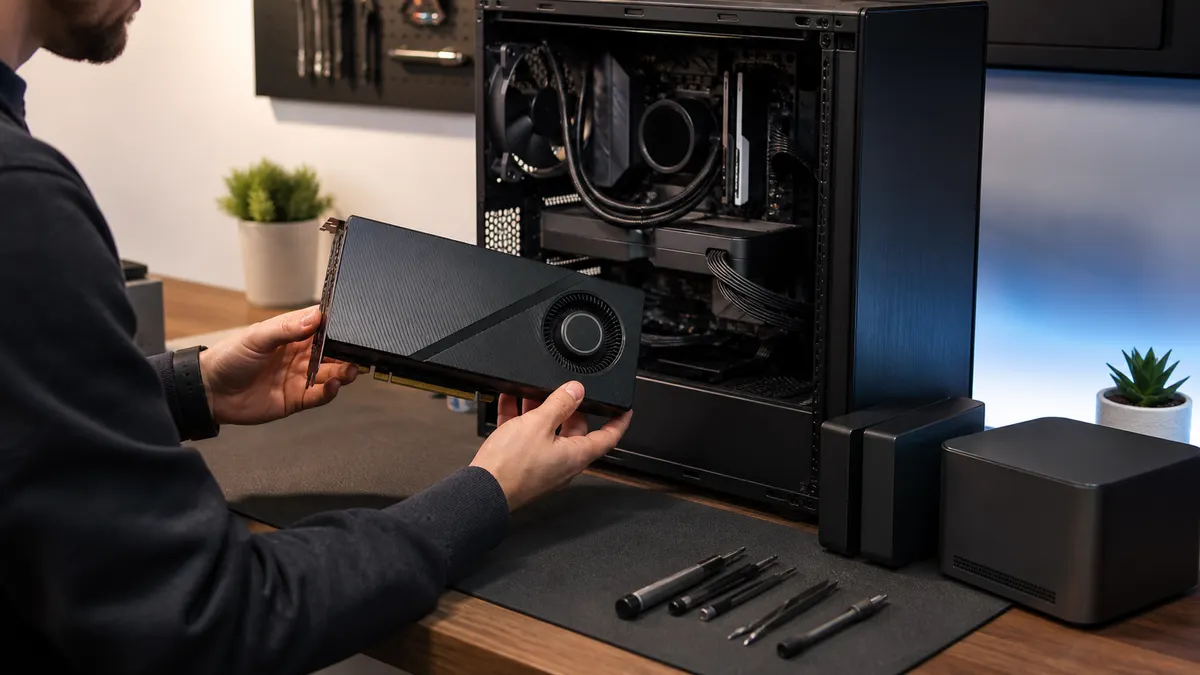
The 96GB GPU is the kind of part that makes a local AI desk feel serious before it has done any work.
That is the trap.
NVIDIA's RTX PRO 6000 Blackwell Workstation Edition is not vapor, and it is not a toy. NVIDIA's current specs list 96GB of ECC GDDR7 memory, 1792GB/s of memory bandwidth, 4000 AI TOPS, 24,064 CUDA cores, PCIe Gen 5 x16, four DisplayPort 2.1 outputs, and a 600W maximum power draw. B&H listed the OEM card in stock at $12,999 when checked on August 6, 2026. Dell's listing for the same class of 600W card showed $14,874.99.
Those numbers matter. So does the part nobody wants to say out loud: a lot of home-lab AI buyers do not need this card yet.
The RTX PRO 6000 belongs in the conversation when a real model, dataset, video workload, simulation, or client deliverable is actually blocked by smaller cards. It is not the right first answer just because local AI is moving fast, YouTube thumbnails are loud, or "96GB" feels like future-proofing.
Affiliate disclosure: TokenByte may earn a commission if you buy through future gear links. This guide is based on current NVIDIA, retailer, and software documentation plus practical system planning, not paid placement or TokenByte hands-on RTX PRO 6000 benchmark results.
Use this with the Build Picker, Recommended Gear, Mac mini local AI guide, ComfyUI GPU guide, and How We Test. TokenByte has not benchmarked this card in the lab for this article. Treat this as a buying filter before you spend workstation money.
The fast verdict
Buy a 96GB professional GPU when your work can already prove that 24GB, 32GB, or 48GB is the bottleneck.
Do not buy one because you want to skip the thinking. Expensive VRAM does not fix weak prompts, messy datasets, slow storage, bad cooling, unstable Python environments, weak power delivery, poor model selection, or a workflow that still fits on a cheaper card.
The best buyer is boringly specific: a developer, researcher, studio, consultant, or business that has a known local AI job where memory capacity, ECC, driver stability, support expectations, and single-GPU simplicity are worth more than the cheapest frames or tokens per dollar.
The worst buyer is a hobbyist with a blank plan and a full shopping cart.
What the RTX PRO 6000 actually gives you
The reason to care is not only the 96GB number. It is the full workstation shape around it.
NVIDIA lists the RTX PRO 6000 Blackwell Workstation Edition with 96GB of GDDR7 memory with ECC, 1792GB/s of memory bandwidth, 600W maximum power consumption, fifth-generation Tensor Cores, fourth-generation RT Cores, four ninth-generation NVENC encoders, four sixth-generation NVDEC decoders, and a double flow-through dual-slot cooler.
B&H and Dell listings add practical buyer details: 24,064 CUDA cores, a 512-bit memory interface, PCIe 5.0 x16, one 16-pin power connector, a 12-inch card length, 5.4-inch height, and Windows workstation compatibility language. B&H's public listing also showed the card in stock at $12,999 during this run, while Dell showed a higher price.
That is not a normal "add a GPU and see what happens" purchase. It is a whole-platform decision.
A 600W workstation GPU wants the rest of the machine to be adult-sized: case airflow, a serious power supply, the right cable clearance, a motherboard slot layout that does not choke the cooler, enough CPU and system memory to keep the card fed, and storage fast enough that loading data is not the new bottleneck.
If the workstation around it is weak, the card will still be impressive. The build will not be.
The 96GB question is really a workload question
VRAM is easy to misunderstand because it feels like RAM shopping. Bigger is better, until the bill arrives.
For local AI, more GPU memory can be valuable. It can let you load larger models, run larger context windows, keep heavier image or video workflows resident, batch more work, serve multiple smaller jobs, or avoid offloading that turns a fast system into a waiting room.
But capacity only matters when the job uses it.
If your daily work is a 7B or 14B local chat model, lightweight RAG, small code assistant experiments, basic ComfyUI image generation, document summarization, or automation glue, a 96GB professional card is probably not the next rational upgrade. You may get more value from a used RTX 3090, an RTX 4090, an RTX 5090, a 48GB workstation card, faster storage, better backups, a second machine, or simply finishing the workflow.
If your daily work is memory-bound inference, fine-tuning, large local model evaluation, AI video work, 3D and simulation workloads, high-resolution generation, multi-user local serving, or customer projects where failure is expensive, the conversation changes.
The test is simple:
Can you name the workload that breaks a 48GB card?
If not, you are shopping for comfort, not capability.
Why 48GB is the comparison point
The smarter comparison is not always RTX PRO 6000 versus RTX 5090.
RTX 5090 is useful as a consumer high-end reference. NVIDIA lists it with 32GB of GDDR7, 21,760 CUDA cores, PCIe Gen 5, 575W total graphics power, and a 1000W reference system-power note. It is a fast, power-hungry card with far less memory than RTX PRO 6000, but it can be the better fit for many local AI users when speed, gaming-adjacent flexibility, and consumer pricing matter more than ECC and workstation support.
The more interesting middle is 48GB.
A 48GB card can be enough for a surprising amount of serious local AI work. It also forces discipline. You learn which models fit, which quantizations are acceptable, how much context you really need, when batching matters, and whether the job is actually memory-bound. That experience is valuable because it tells you whether 96GB would change the result or merely feel nicer.
Buying the 96GB card first skips that learning and makes every other mistake more expensive.
For some professionals, skipping the middle is still correct. If a client deadline, research need, or production workflow already proves that 48GB is short, the cost of underbuying can be worse than the cost of the card. But that is a proof-based purchase, not a vibe-based one.
Power and cooling are part of the price
The sticker price is only the first number.
NVIDIA lists the workstation edition at 600W. The RTX PRO 6000 family page also shows three broad shapes: Server Edition at 400W to 600W with passive cooling for server airflow, Workstation Edition at 600W with double flow-through cooling, and Max-Q Workstation Edition at 300W for denser multi-GPU workstations.
That split matters. The passive server card is not meant for a normal quiet desktop case. The 600W workstation card is not meant for a small compromise case with decorative airflow. The Max-Q card exists because dense workstation builds have different thermal and power priorities.
If you are building at home, plan the boring parts first:
- A case that gives the card room to breathe.
- A PSU with clean headroom and the right native cable path.
- Enough clearance that the 16-pin power connector is not bent hard against glass.
- A motherboard layout that does not starve the intake side.
- Intake and exhaust that work under sustained load, not just a five-minute test.
- Noise expectations you can live with in the room where you actually work.
TokenByte has already covered GPU power-cable planning, PCIe lane planning, airflow, and scratch drives because those are not side quests. They are the difference between owning a fast workstation and owning an expensive instability generator.
The software stack can justify the card or waste it
Ollama's current hardware support docs list RTX PRO 6000 Blackwell in the NVIDIA professional Blackwell family and require modern NVIDIA driver support for CUDA paths. NVIDIA's CUDA Linux installation guide, meanwhile, is a reminder that CUDA is not just the card. It is the GPU, the operating system, the driver, the toolkit, the compiler/toolchain reality, and the framework on top.
That sounds obvious until the first weekend disappears into driver, container, and Python dependency work.
Before buying a 96GB pro card, decide which stack you are buying it for:
| Stack | Why the big card might help |
|---|---|
| Ollama or llama.cpp serving | Larger models, larger contexts, fewer offload compromises |
| vLLM or SGLang | Higher-memory local serving and batching experiments |
| PyTorch or CUDA development | Training, fine-tuning, evaluation, and custom kernels |
| ComfyUI or image/video pipelines | Higher resolution, heavier graphs, more models resident |
| 3D, rendering, simulation, media | Workstation GPU features plus large ECC memory |
| Multi-user lab box | More room to partition jobs without constantly unloading |
Now write down the first command you will run after the machine is built.
If you cannot do that, pause the purchase. A serious card deserves a serious first job.
ECC is not just a spec-sheet flex
ECC memory is easy to ignore in home-lab discussions because many hobby workflows can tolerate a bad run. If an image generation fails, you retry. If a chat response is weird, you throw it away. If a benchmark has an outlier, you rerun it.
That is not every workload.
ECC starts to matter when wrong answers are expensive to chase, long jobs run unattended, datasets are large, outputs feed downstream work, or the machine is part of a professional pipeline. It is less about looking enterprise and more about reducing a category of silent data reliability risk.
That does not mean every local AI lab needs ECC. It means ECC belongs in the "why this card" column only if the work deserves it.
If you are mostly experimenting, ECC is probably not the reason to spend RTX PRO 6000 money. If you are billing for repeatable local compute, working with long-running jobs, or sharing a workstation across users, it becomes easier to defend.
When the 96GB card makes sense
The RTX PRO 6000 starts making sense when several of these are true at the same time:
- Your workload has already failed or become painful on 32GB or 48GB.
- You need one large local GPU rather than multiple smaller cards.
- You care about ECC and workstation-class support.
- You can use CUDA, PyTorch, Ollama, vLLM, SGLang, ComfyUI, or rendering tools in a way that actually consumes the memory.
- You have the case, PSU, cooling, storage, and OS plan ready.
- You have a return, resale, or project-payback reason if the card disappoints.
- The machine earns money, saves cloud spend, protects private work, or removes a real delivery bottleneck.
That last line is the whole purchase.
If the card does not earn money, save money, protect a workflow, or unblock a concrete project, it is probably too early.
When to skip it
Skip the 96GB card if your local AI setup is still undefined.
Skip it if you have not measured what actually fails today.
Skip it if your machine still has weak storage, shaky backups, no job queue, poor airflow, or a cheap PSU.
Skip it if your main goal is learning. Learning on a less expensive GPU is not a downgrade. It is tuition control.
Skip it if the model you run every day already fits comfortably on 24GB or 32GB.
Skip it if the card would force compromises everywhere else: bad case, cramped desk, loud fans, no 10GbE, no backup plan, no UPS, or no budget left for the software and data work.
Most importantly, skip it if you are buying it to feel done. Local AI hardware is never done. The only durable win is a setup that matches the work.
A better buying ladder
Here is the more practical path for most readers:
- Start with the smallest machine that proves the workflow.
- Move to a 24GB or 32GB card when GPU memory or speed becomes visible pain.
- Consider 48GB when the job is serious and repeatable.
- Consider 96GB only after 48GB is not enough or when workstation reliability is part of the requirement from day one.
That ladder is slower than buying the biggest card immediately. It is also harder to fool yourself.
The point is not to avoid expensive parts forever. The point is to make expensive parts answerable to evidence.
For a paid local AI workstation, that evidence can be simple: a model that will not load, a batch that spills to CPU, a video workflow that cannot stay resident, a dataset that forces ugly cuts, a client demo that needs to run without cloud, or a multi-user box that keeps thrashing.
When the evidence is real, the purchase conversation gets clean.
The practical rule
The RTX PRO 6000 Blackwell Workstation Edition is a serious local AI card. It has the memory, bandwidth, CUDA support, encoder/decoder hardware, and workstation positioning to anchor a high-end AI desk. It also has a price high enough to punish vague plans.
Do not ask whether 96GB is better than 48GB.
Ask whether your actual work fails at 48GB in a way that $12,999 to $14,874.99 plus the rest of the workstation will fix.
If yes, build the machine properly and treat the card like infrastructure.
If no, buy lower, measure harder, and keep the difference for storage, networking, backups, power, software, and the next round of hardware that will arrive sooner than you think.
The best local AI build is not the one with the largest number on the GPU box. It is the one where the expensive part is solving a problem you can already name.
Found something that needs correcting? Tell the editor. Research, estimates, and hands-on measurements should be identified in the article. Read our affiliate disclosure.